Every store's repairs, vendors and spend, in one place.
Clarvoy sends each work order to the right vendor, checks that the tech was actually at the store, checks every bid and invoice, and answers questions about your account in plain English. Each person sees only the stores and tools that are part of their job.
The demo opens a sample 48-store restaurant group. There's no sign-up, and you can click anything.
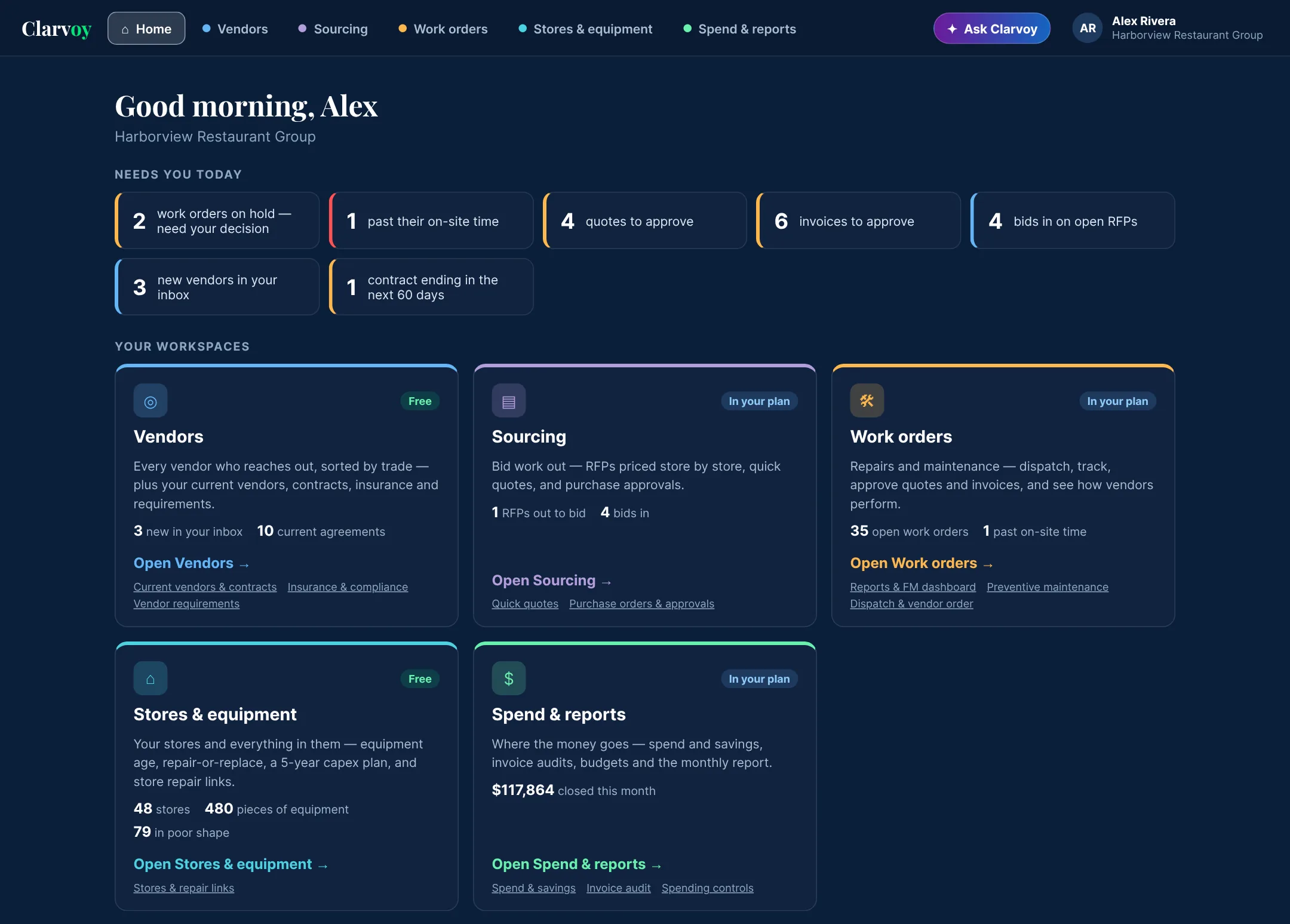
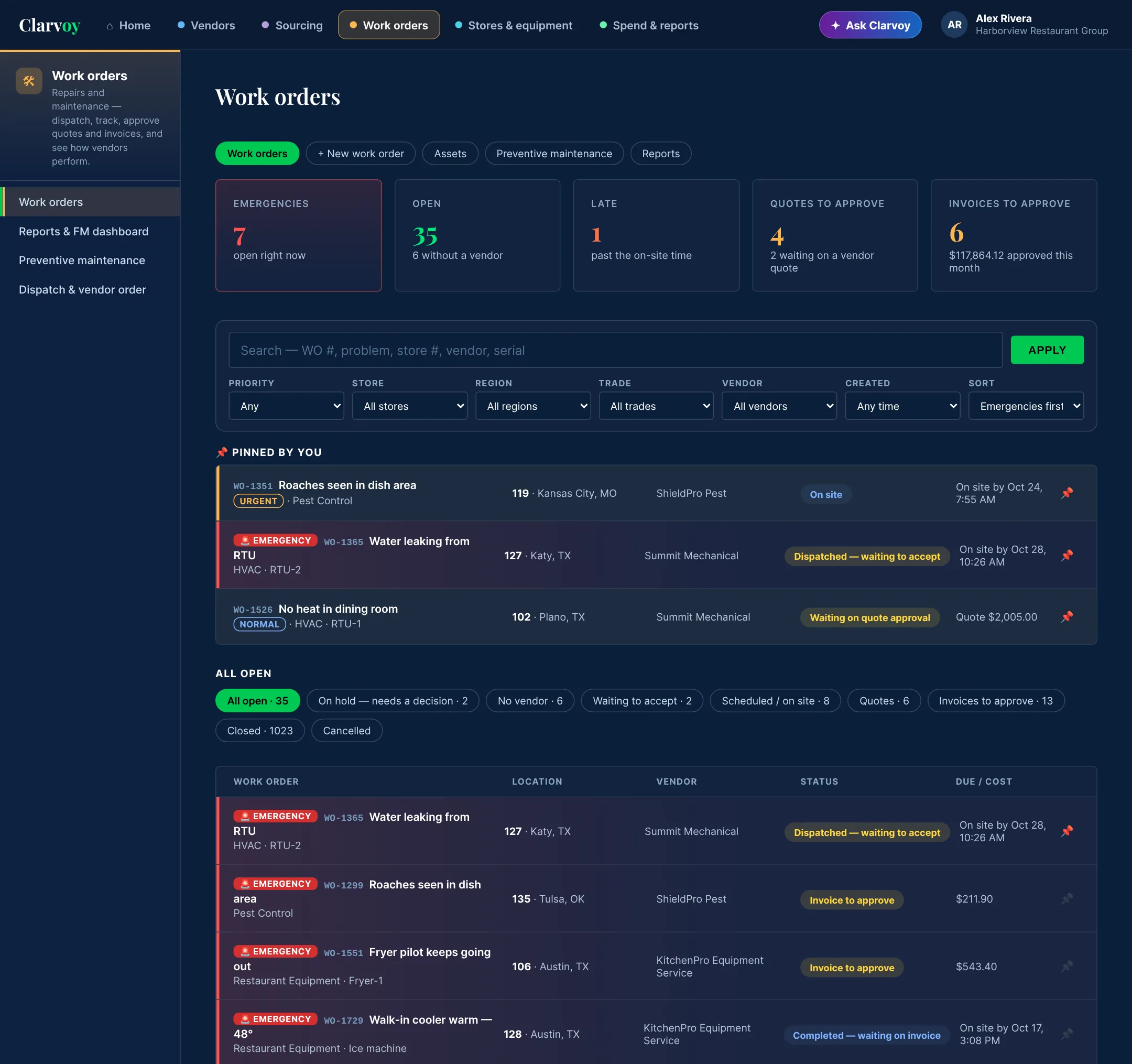
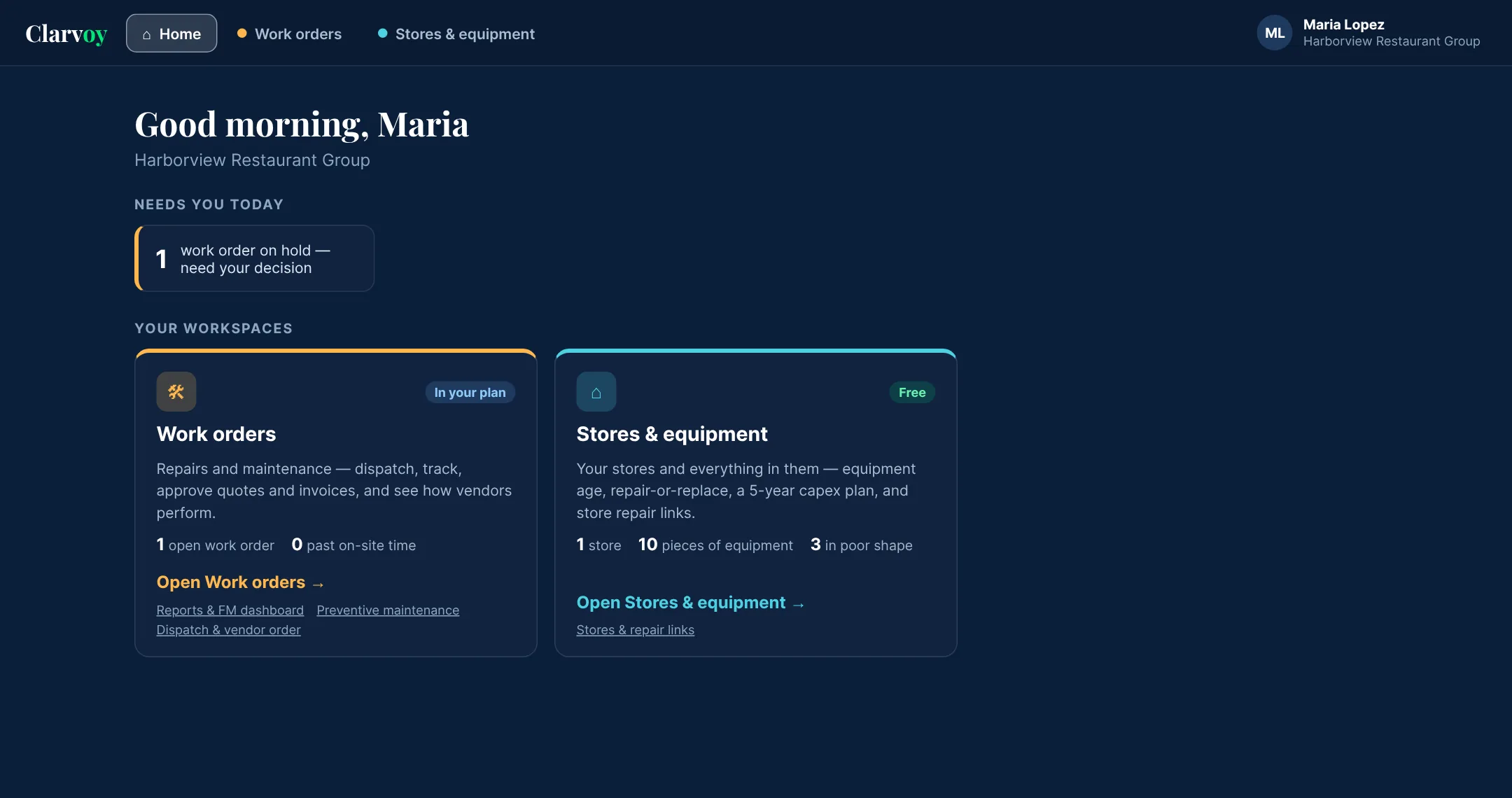
Screens from the live demo. Harborview Restaurant Group is a made-up company.
Five workspaces and an assistant, all sharing the same data.
Each workspace has its own color and menu, so you always know where you are. Stores, vendors, contracts and equipment are entered once and used everywhere. Start with the free ones and add the rest when you need them.
Vendors
Every vendor who wants your business, sorted by trade, plus the vendors you already use, with their contracts, insurance and rates.
Sourcing
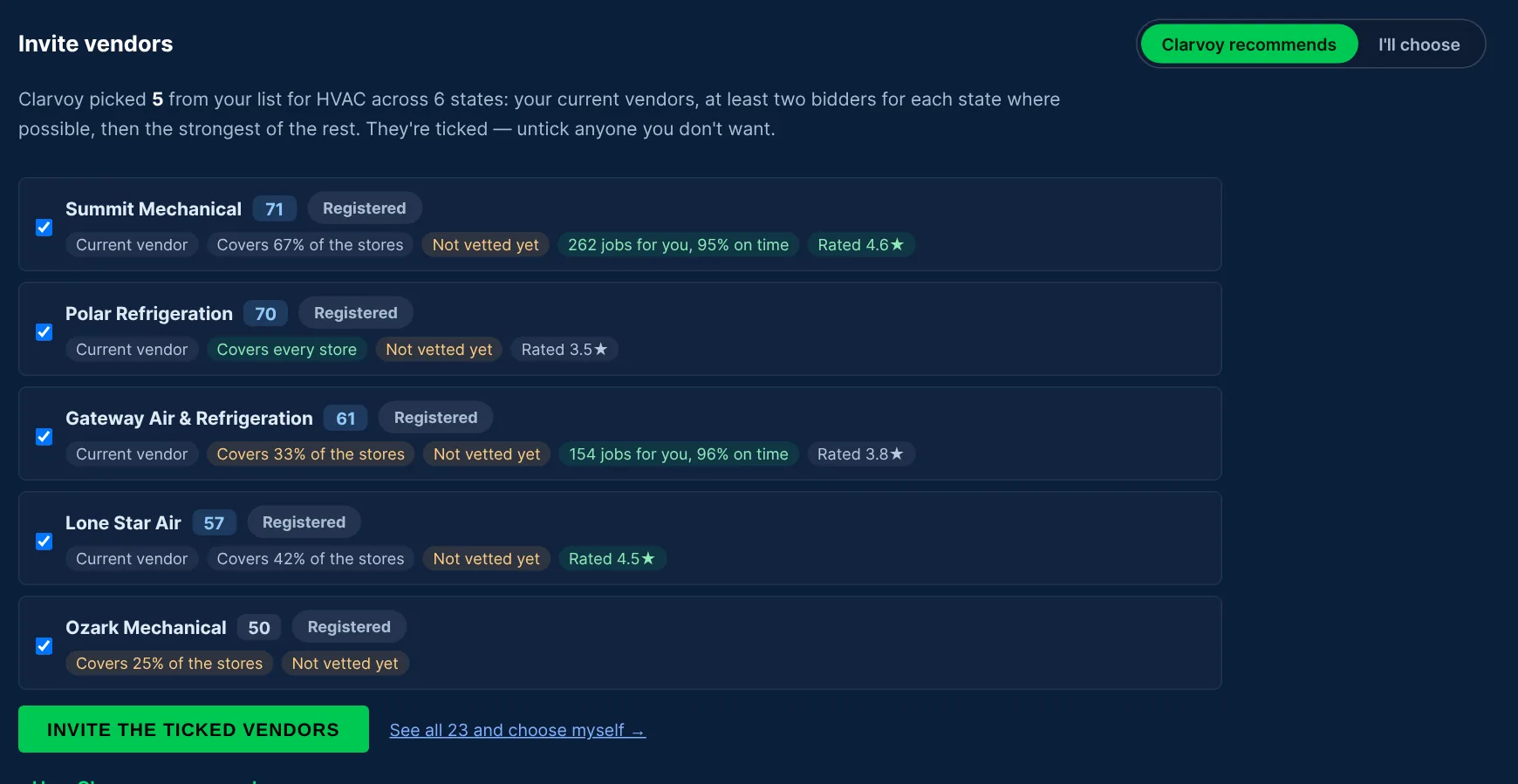
RFPs priced store by store. Clarvoy recommends who to invite, then shows where each bid is high, low or missing something.
Work orders
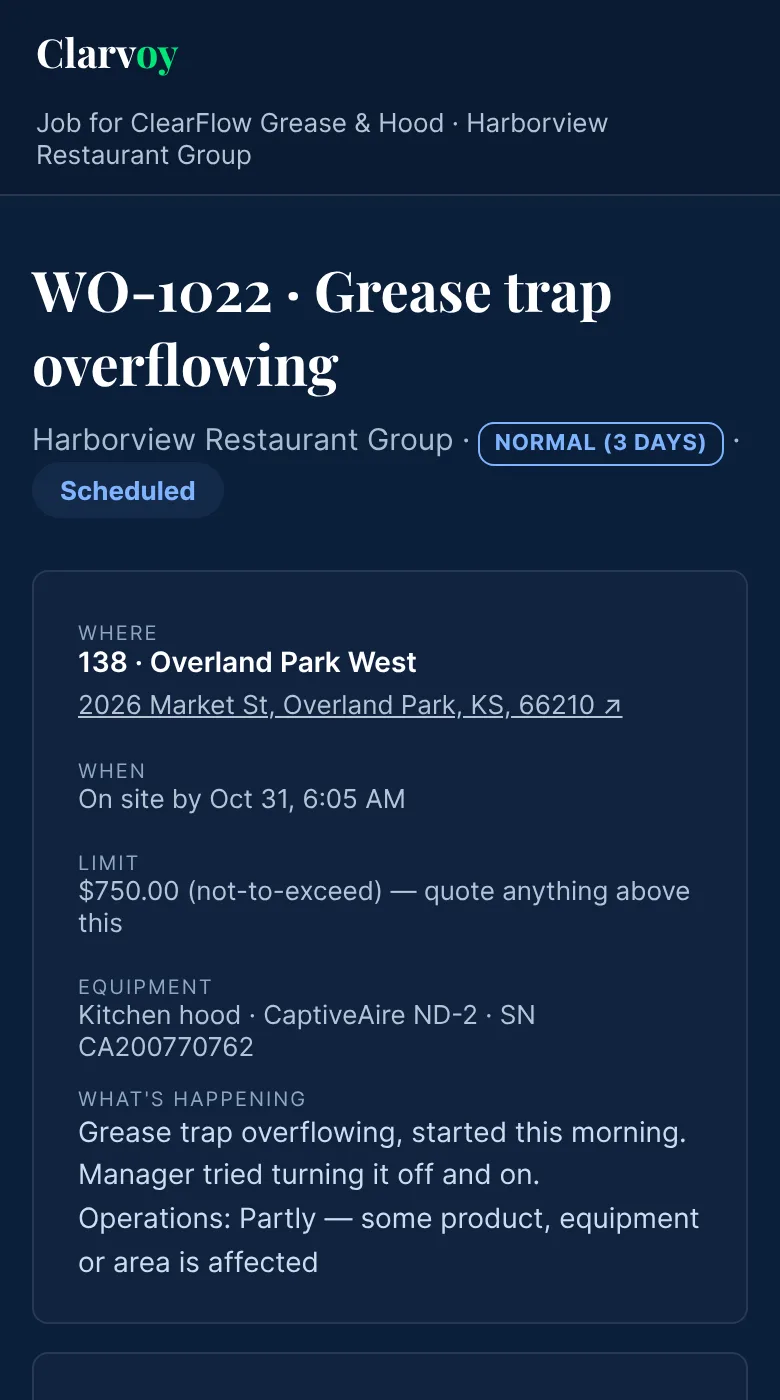
Dispatch, track and approve. Emergencies stay at the top, duplicates and recalls are held for you to decide, and every check-in is verified by location.
Stores & equipment
Every store and everything in it: equipment age, repair or replace, a five-year capex plan, and repair-request links for each store.
Spend & reports
The FM dashboard, invoice audits, budgets, purchase orders and a monthly report for finance. Click any number to see the work orders behind it.
Ask Clarvoy
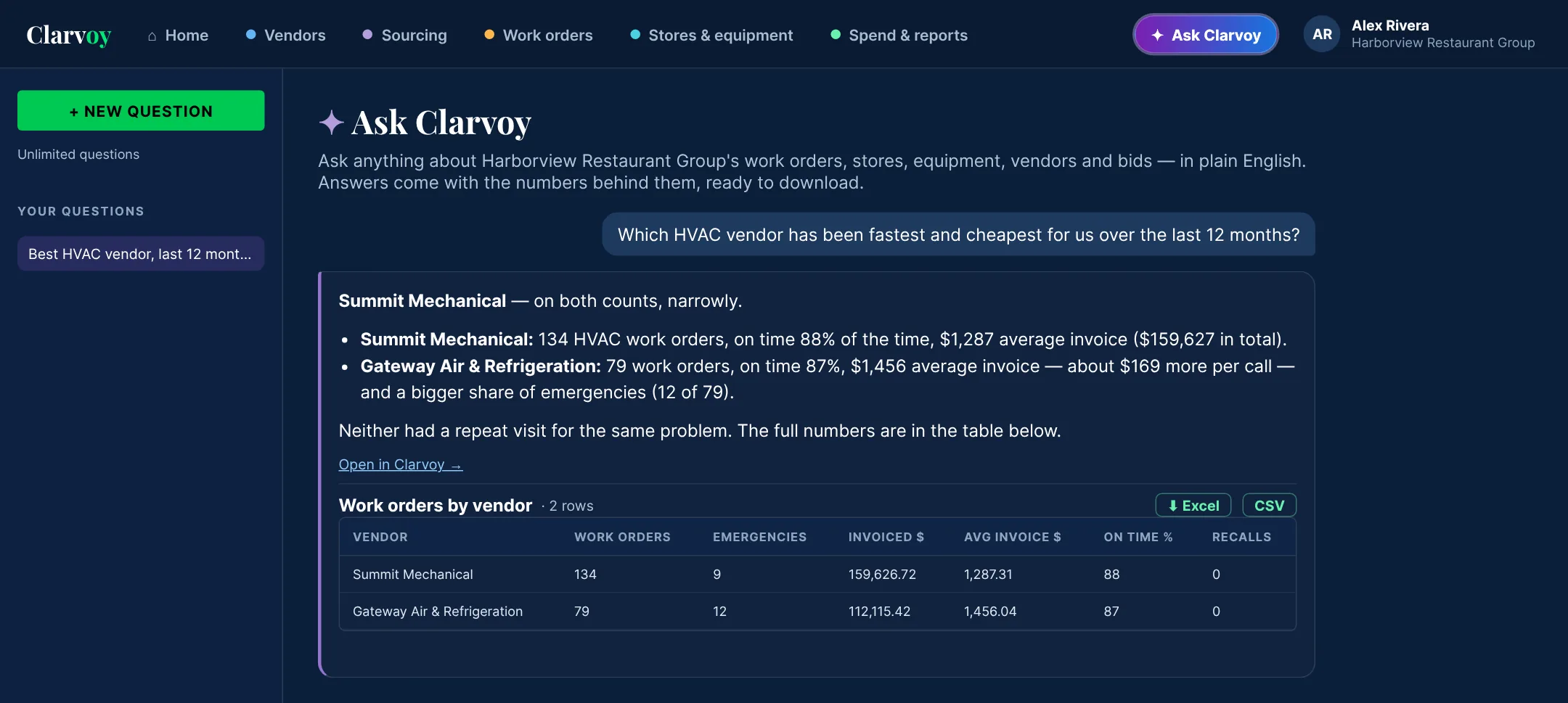
Ask about your account in plain English, like "what's the status of WO-1298?", and download the numbers behind every answer.
The urgent work first, and nothing sent twice.
Every work order goes to the right vendor at the right rate. Your team only steps in when a decision is needed.
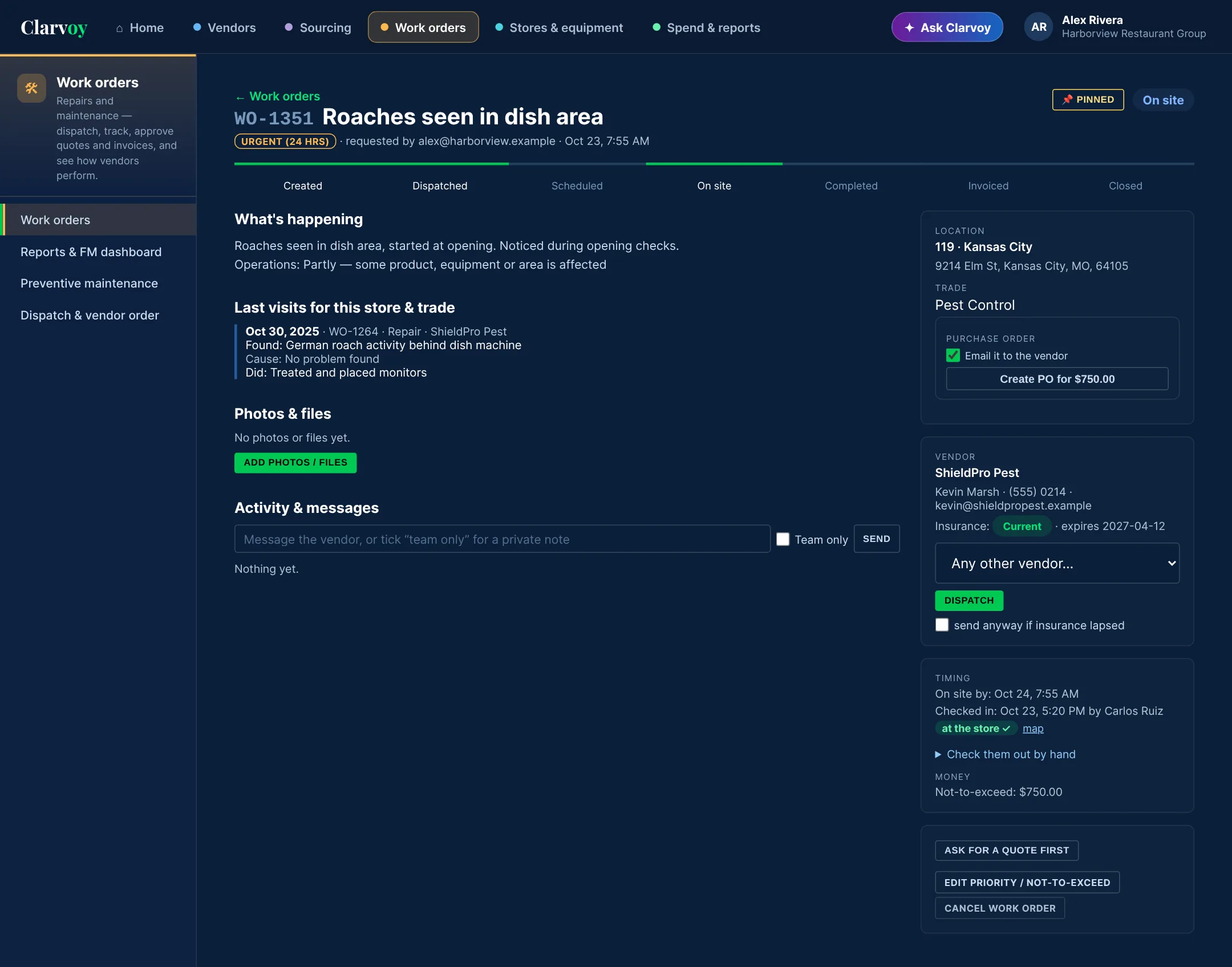
- Emergencies in red, at the top of every list, with a count that tells you how many are open right now.
- Pin the ones you're watching so they stay above everything else, for you.
- Filter by priority, store, region, trade, vendor or date, or search by work order number, problem, store or serial number.
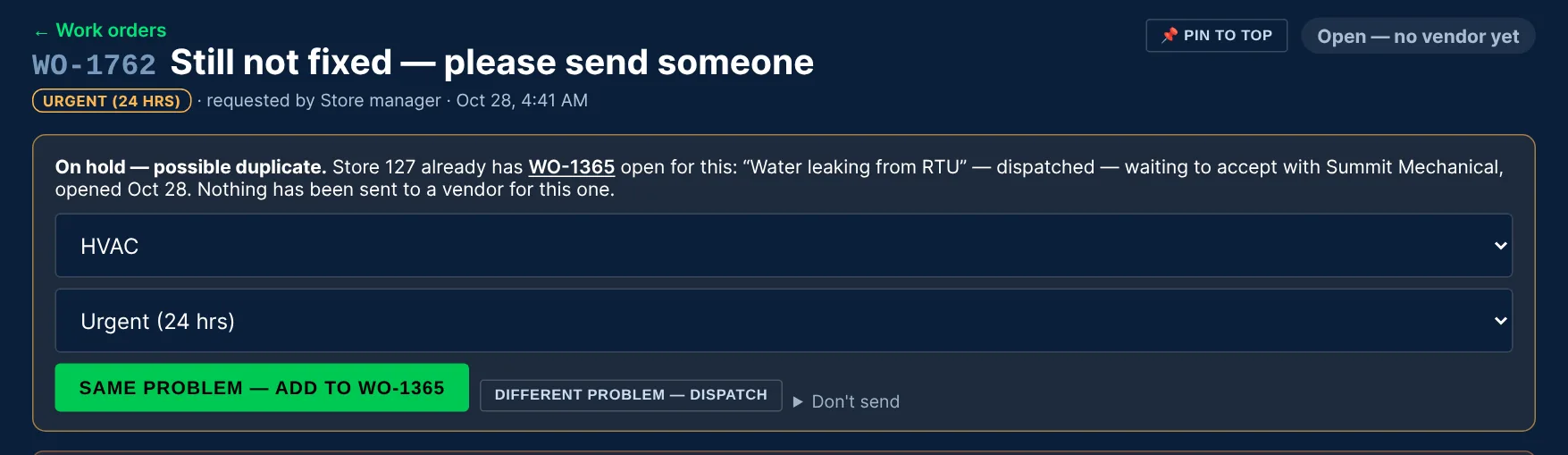
- Duplicates and recalls are held. If the same store already has that problem open, or it was fixed in the last 30 days, Clarvoy holds the new one and asks you before sending it.
- Approval before dispatch for the people you choose, such as store managers. Emergencies still go out right away.
- Every request explains the problem. Stores have to describe what's wrong and how it affects the business before a work order can go out.
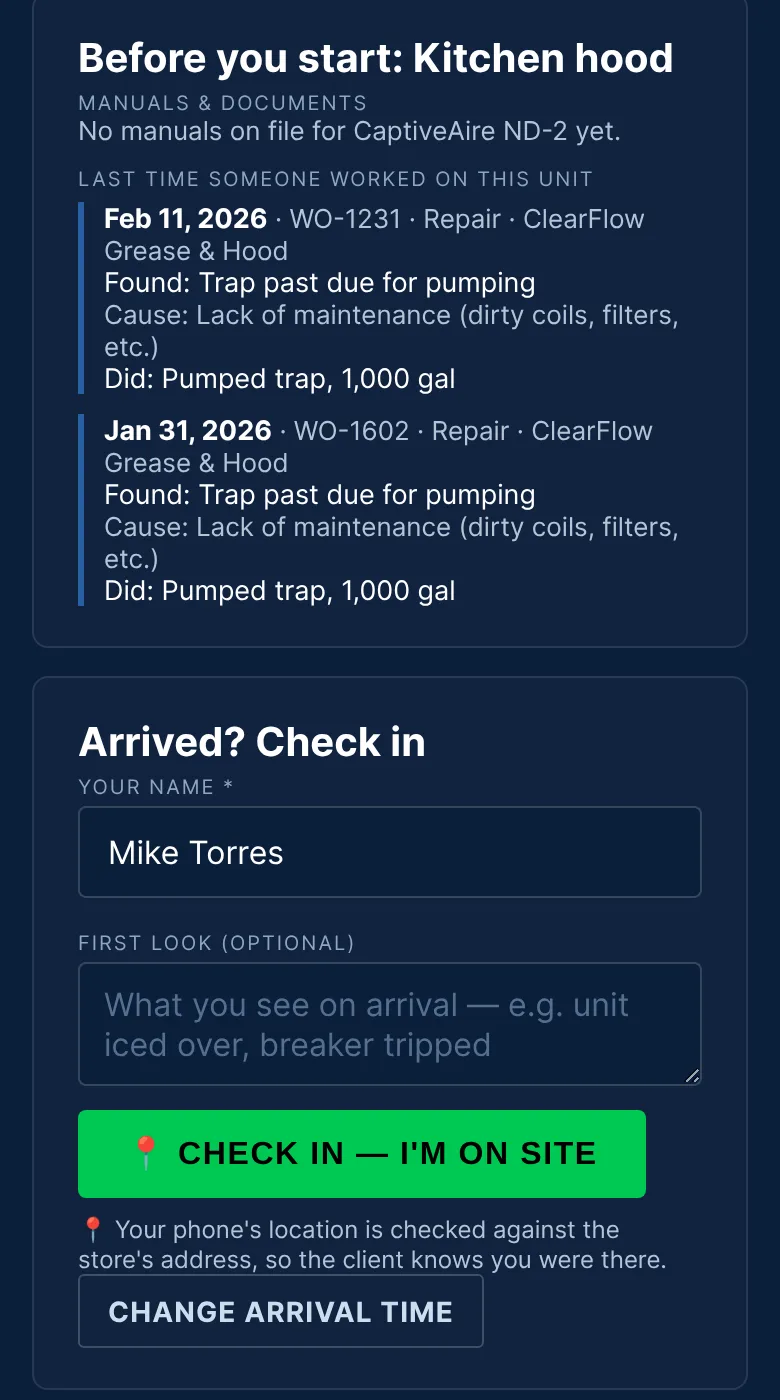
Know the tech was really there, and what they did.
The vendor sends the tech a link. There's no app to install and nothing to sign in to, and it's free for vendors.
- Check-in and check-out are matched to the store's address. You'll see "at the store", or a warning if the phone was somewhere else.
- No phone? Check them in by hand, and record how you know they were there: store staff saw them, the tech called, or the sign-in sheet.
- Notes at every step. The tech records what they see on arrival and what they did before they leave.
- Photos can be required. Turn on "after" or "before and after" photos for every work order, and techs can't check out without them.
- Before they start, they see the manuals and what the last techs found on that unit.
Ask your account anything. Get the answer and the spreadsheet.
Ask in plain English and Clarvoy looks it up in your work orders, stores, equipment, vendors and bids. You get a short answer with the table behind it, ready to download to Excel.
- Only your company's data, and only the stores each person is allowed to see.
- It can't change anything. It only reads your account, and each person's questions are private to them.
- Every answer is exportable to Excel or CSV.
100 questions a month are included with Everything, and the free trial includes 25.
Invite the right vendors, then see exactly what their bids mean.
Build an RFP from your store list and specs. Vendors bid store by store from their own dashboard, for free.
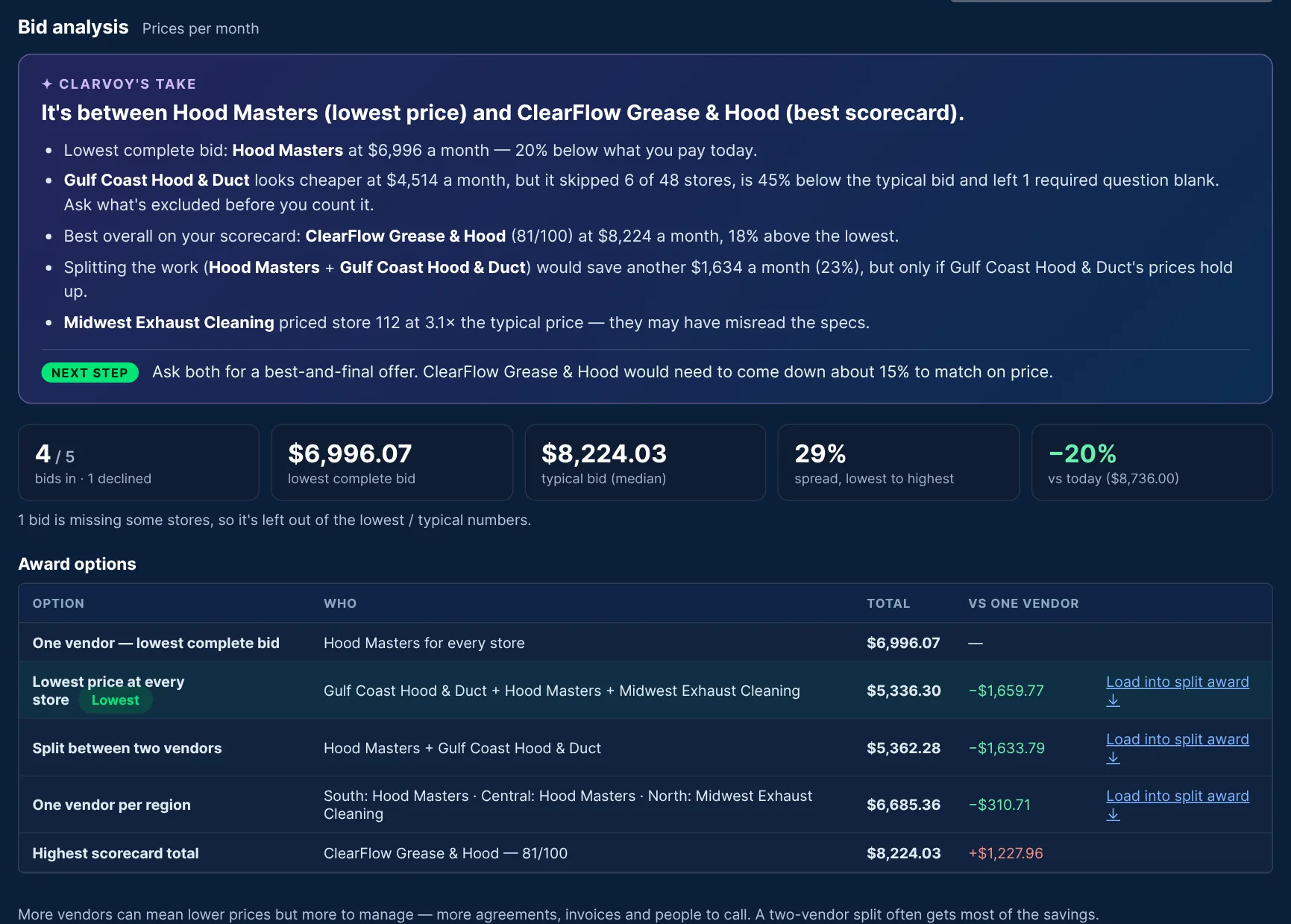
- Weighted scoring your whole team can contribute to.
- Best-and-final rounds and split awards by region or store group.
- Sign-offs recorded: NDA, legal review and approvals.
- Contracts that enforce themselves: CPI caps, fuel formulas, SLA credits and insurance minimums.
Every vendor who wants your business, organized. Every vendor you use, accountable.
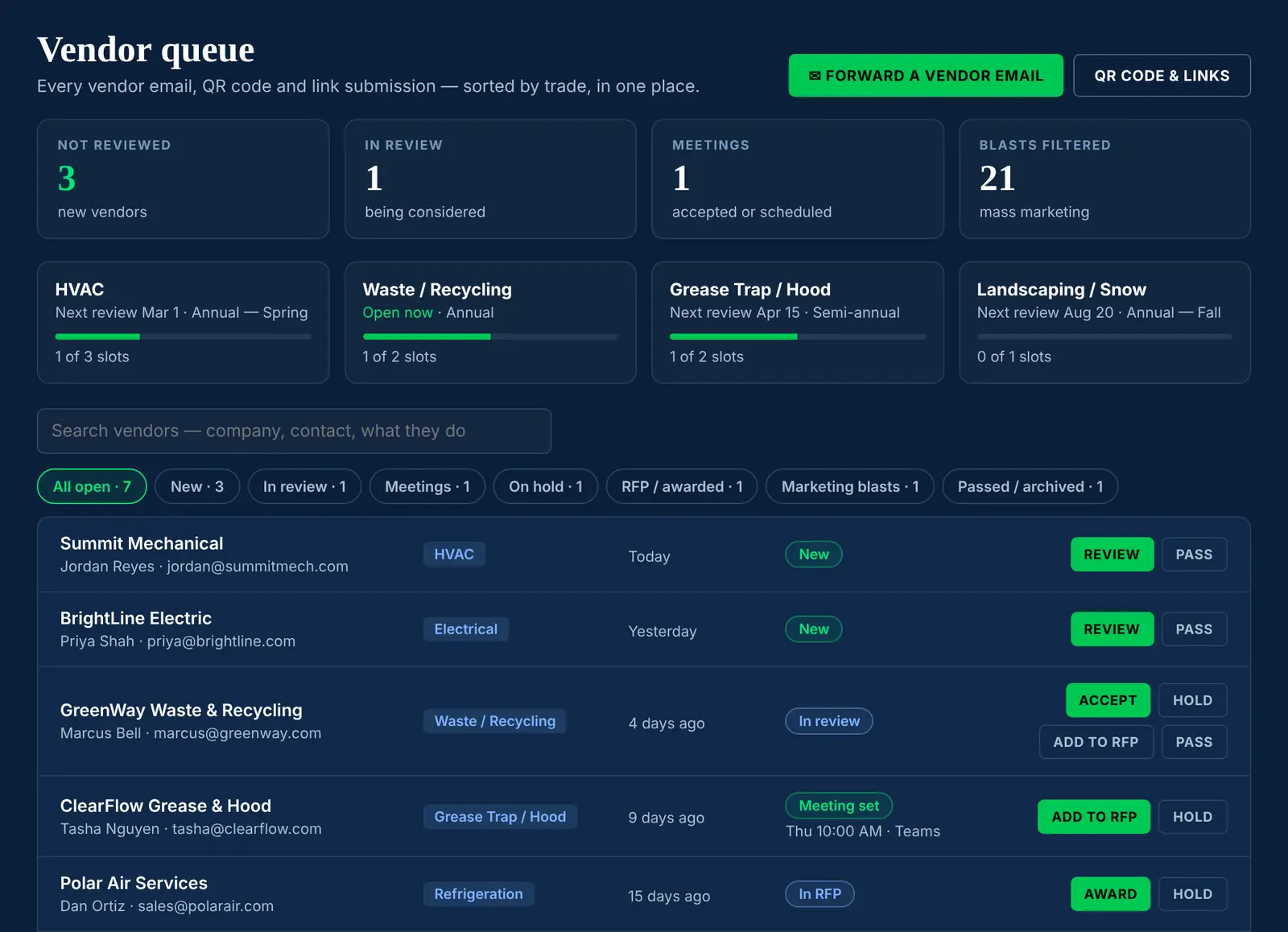
Forward vendor emails to one address, or share a QR code at trade shows. Clarvoy sorts each one by trade, tells them when that trade is next reviewed, and filters out mass marketing.
- Insurance and W-9s collected and read, with reminders before anything expires. Dispatch is held if coverage lapses.
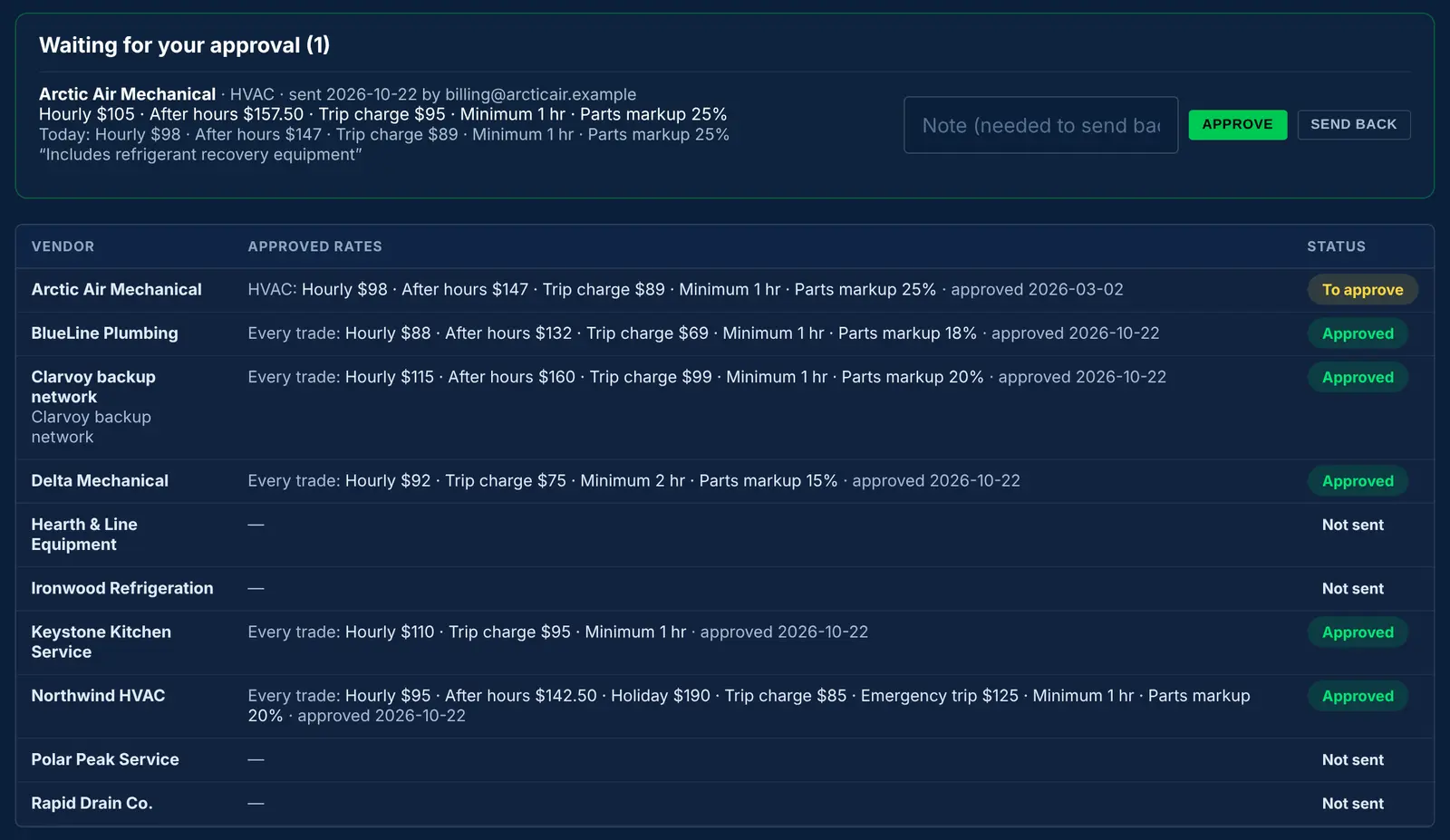
- Rates for your account. Vendors submit them, and your approvers approve them or send them back.
- Every vendor's qualification at a glance: five levels from Registered to Preferred, with background checks (sanctions and federal exclusion lists), references, insurance and their record with you. Clarvoy re-checks your vendors every 30 days and tells you if anything changes.
Click any number and see the work orders behind it.
Work orders from Clarvoy and history imported from ServiceChannel or Fexa, in one view. Break it down by brand, region, district, FM manager, state, trade, vendor or piece of equipment.
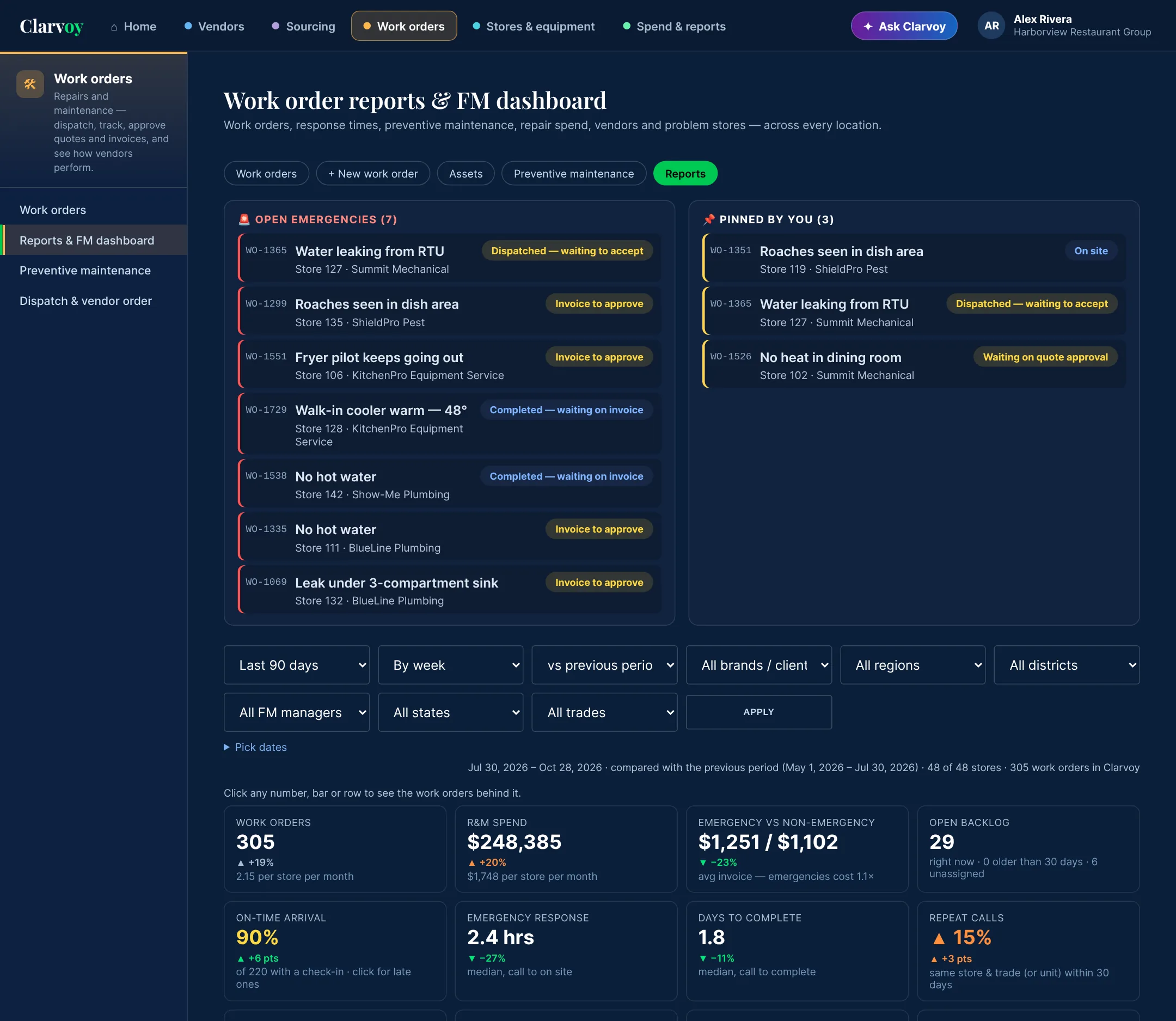
Everything that matters, on one screen
Open emergencies and your pinned work orders up top. Below that: spend per store, emergency versus routine cost, on-time arrival, response times, repeat calls, preventive share and how long quotes and approvals sit, each compared with the last period.
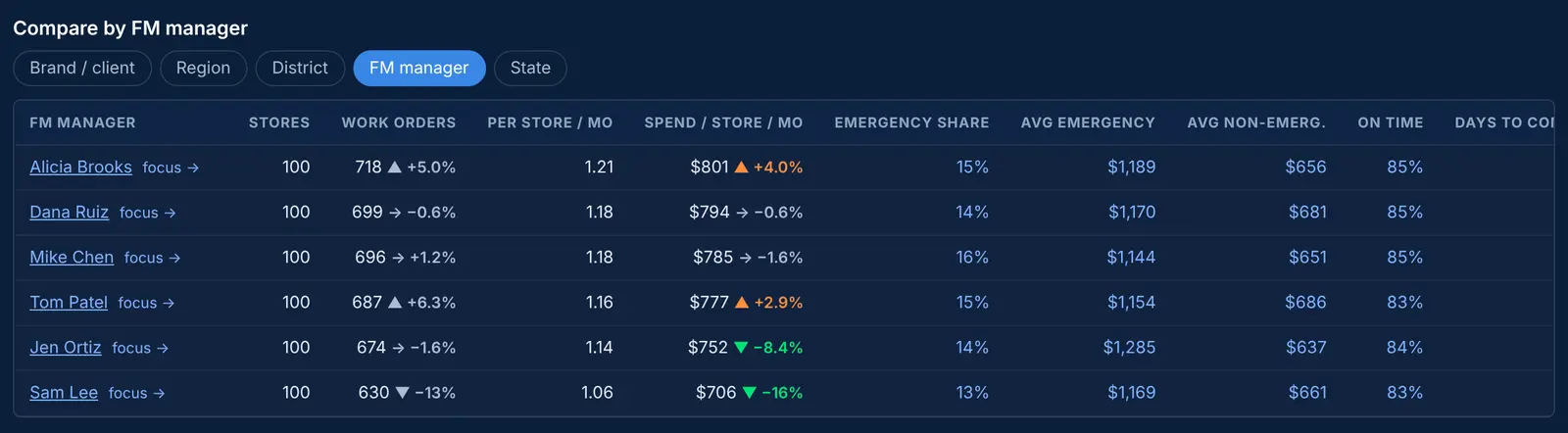
Who's doing well, and who isn't
Regions, districts and FM managers side by side, with the change from last period or last year.
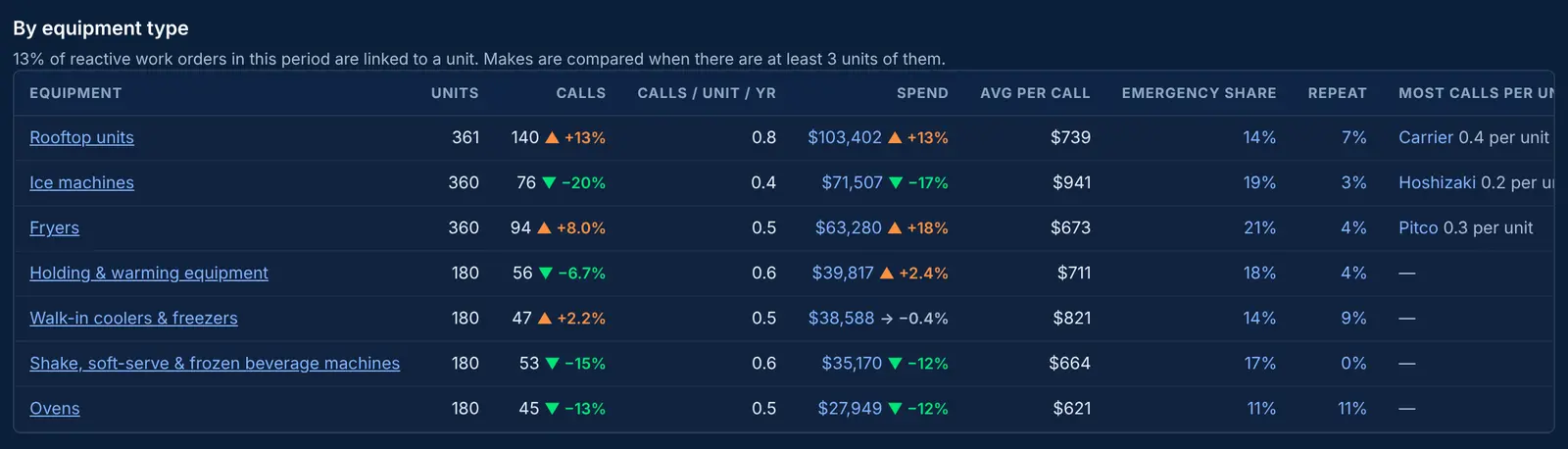
Fryers, ice machines, rooftop units…
Calls per unit per year and cost per call for each type of equipment, and which makes fail most, so the next purchase is a better one.
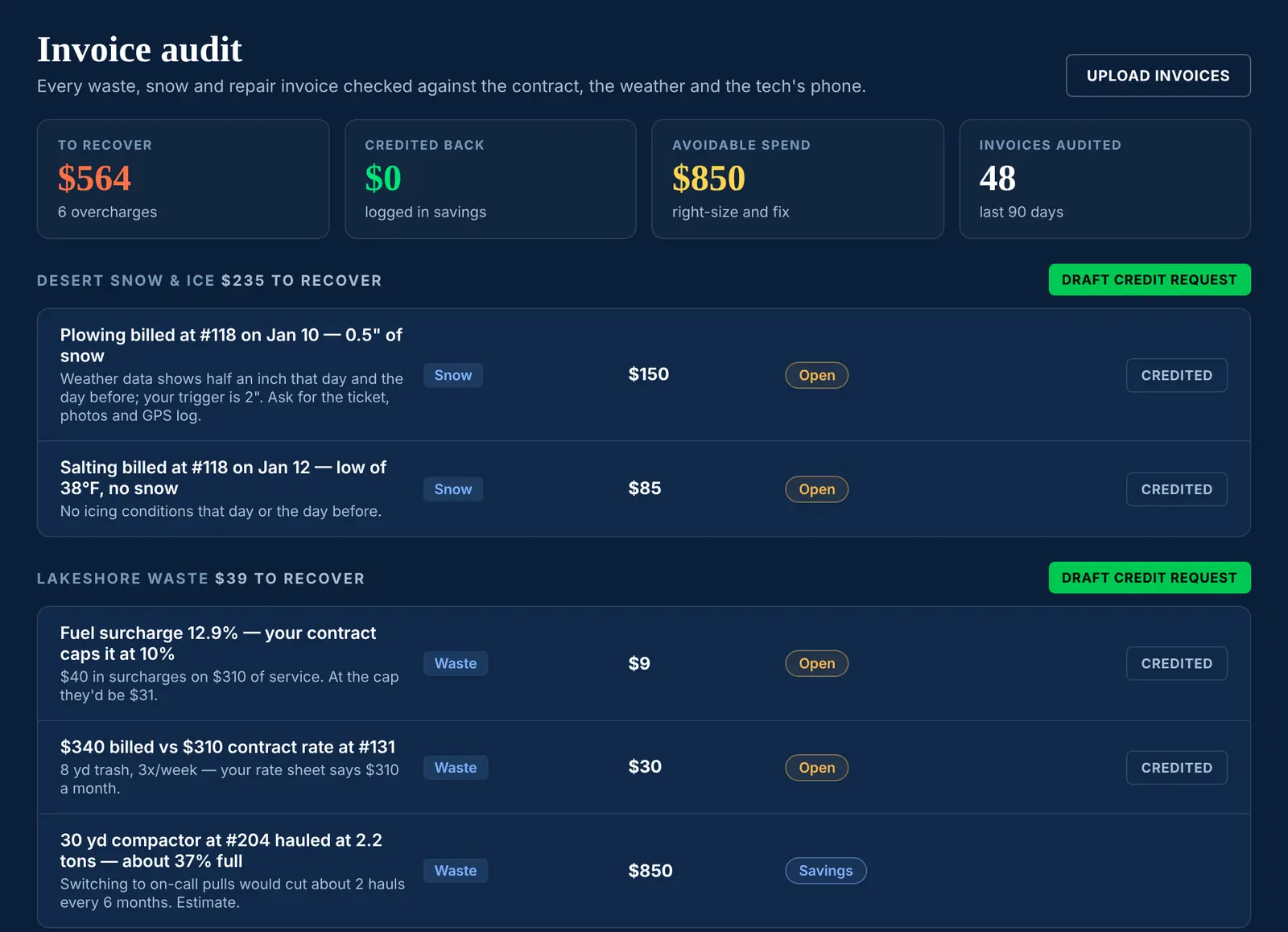
Pay for what was agreed, and what actually happened
Repair invoices are checked against the tech's time on site and your approved rates, snow invoices against the weather, and waste invoices against the contract. Then Clarvoy drafts a credit request for each vendor.
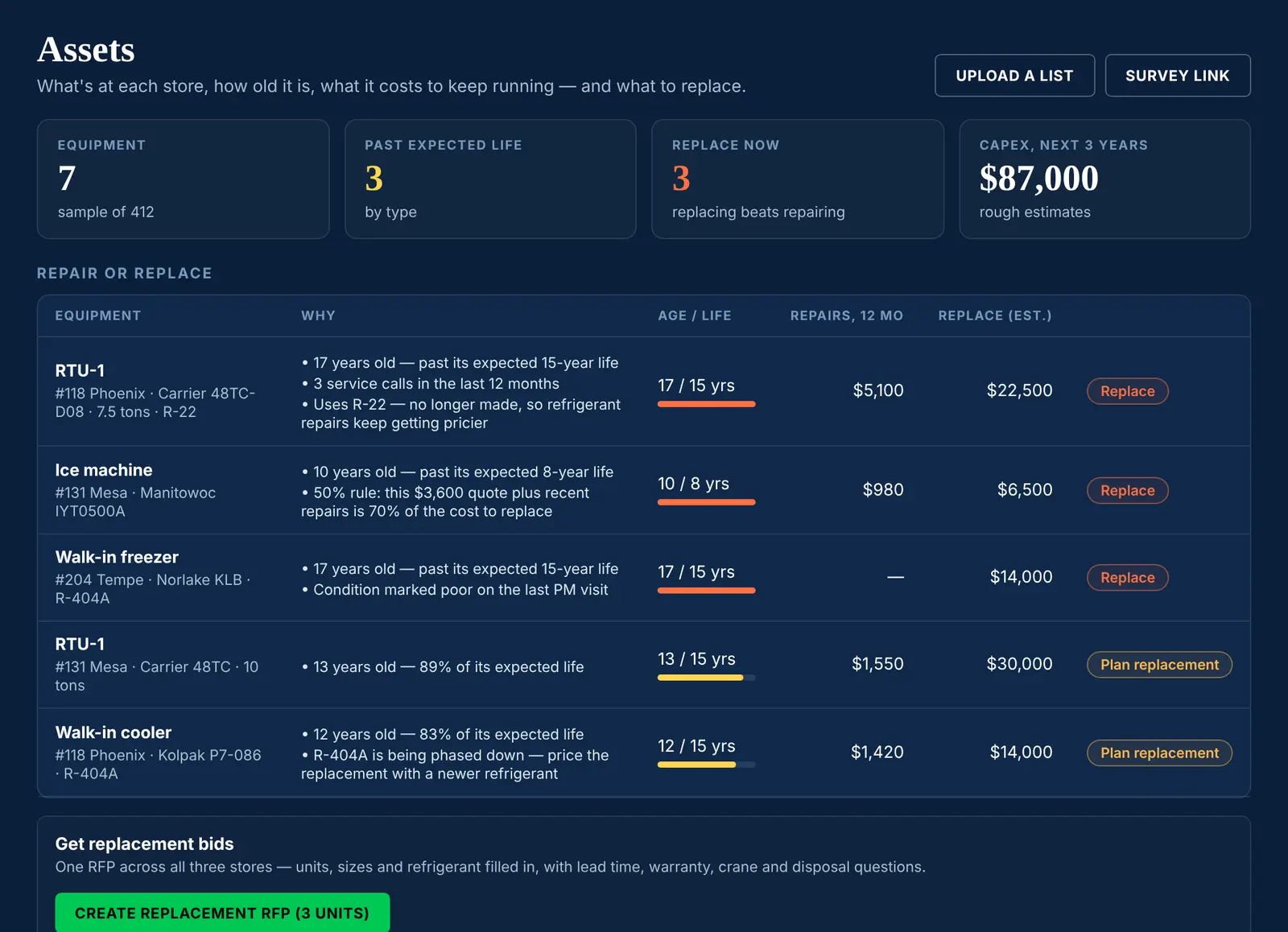
Know what's at every store, and what to replace next.
Send a survey link to your vendors. Techs photograph each nameplate, and Clarvoy reads the make, model, serial number and age.
- Repair or replace, flagged automatically from age, repair history, refrigerant use and quotes.
- A five-year capex plan, and one RFP for every unit that should be replaced.
- Warranty checks before you pay for a repair the manufacturer should cover.
- A repair link and QR code for every store, so staff can request repairs without a login.
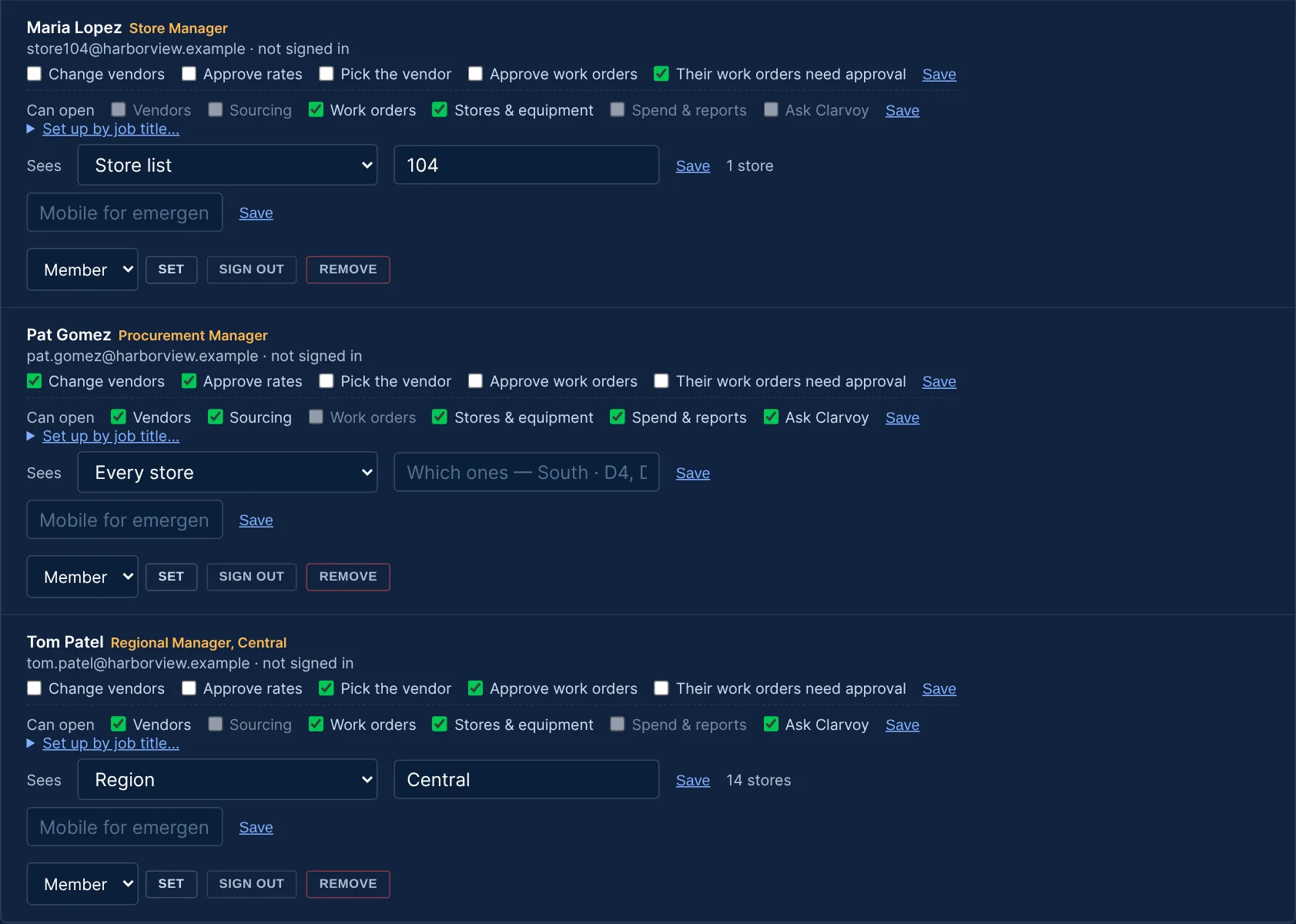
A VP sees everything. A store manager sees their store.
For each person, you choose which stores they see and which parts of Clarvoy they can open. You can also start from a ready-made setup for their job title, then adjust it. Everyone on your team is included at no extra cost.
VP or director
Every store, every workspace, and the numbers behind every decision.
Regional or district manager
Only their region's stores. They approve and assign work orders, but don't see RFP pricing or spend.
Store manager
Their own store's work orders and equipment. Their requests can wait for approval before they go to a vendor.
Procurement
Vendors by trade, RFPs scored as a team, and contracts and rates on record.
Finance
Invoices checked before they're paid, POs matched, savings logged, and a monthly report.
Vendors & techs
They accept work, check in, and send quotes, invoices and rates, then get qualified once for every company on Clarvoy.
Fits the way you already work.
Most multi-site teams are partway through a contract with someone. You don't have to replace anything to start using Clarvoy.
Already on ServiceChannel or Fexa?
Import your work order history and keep dispatching there. Clarvoy adds vendor management, sourcing, invoice audits and reports.
Use a facilities aggregator?
Their subcontractors can fill in equipment surveys, and the aggregator can be the last backup in your dispatch order.
No work order system yet?
Turn on Work orders and Clarvoy handles dispatch, PMs, quotes and invoice approvals for every store.
Accounting & spreadsheets
Upload your accounts-payable history to see spend by vendor, and export approved invoices for accounting.
Start free. Pay per location for what you add.
Vendors, Stores & equipment and your whole team are free. Add-ons are priced per location a month, with volume pricing as you grow. Always free for your vendors — no fees on their invoices. Every new account gets a 14-day trial of everything, no card needed.
Free
- Vendor inbox sorted by trade
- Review windows & auto-replies
- W-9 & insurance collection
- Equipment list & capex plan
- Unlimited team members
Work orders
- Dispatch & vendor order
- Location-verified check-ins
- PM schedules & equipment history
- Parts markup checks
- Quote & invoice approvals
Sourcing & contracts
- RFPs & quick quotes
- Recommendations & bid analysis
- Scoring, BAFO, split awards
- Renewals & one-click rebids
Vendor qualification
- Background checks
- OSHA & state licenses
- References & insurance tracking
Analytics
- Invoice audit & SLA credits
- POs, 3-way match & Send to AP
- Spend, savings & CFO report
Plain-English answers with Excel downloads. 100 questions a month are included with Everything.
See it for yourself.
Open the live demo and click through a made-up 48-store restaurant group, or watch the walkthrough (under two minutes).
The live demo
It's the real Clarvoy with sample data, and nothing to sign up for.
- Decide on a duplicate that's on hold
- Pin an emergency and filter the work order list
- See Clarvoy's take on an RFP with every bid in
- Ask Clarvoy a question
Switch between roles to see what each person gets. The demo resets every night and never emails or texts anyone.
Questions teams ask
Do we have to leave ServiceChannel, Fexa or our aggregator?
No. Import your work order history and keep dispatching where you do today. Clarvoy adds vendor management, sourcing, invoice audits and reports. When your contract is up, you can move work orders over, or not.
Can a store manager see only their own store?
Yes. For each person, you choose which stores they see (a region, a district, an FM manager's stores or a list of stores) and which workspaces they can open. A store manager can be limited to their store's work orders and equipment, with their requests waiting for approval before they go to a vendor.
How do we know the tech was really on site?
When a tech checks in or out from their phone, Clarvoy compares the phone's location with the store's address and marks it "at the store", or warns you if it was somewhere else. If the tech has no phone, someone at the store can check them in by hand and record how they know.
What happens if a store reports something that's already open?
Clarvoy holds the new work order and asks you whether it's the same problem, a different one, or a recall on work finished in the last 30 days, before anything goes to a vendor. You choose how many days count as a recall.
Is Ask Clarvoy safe with our data?
Ask Clarvoy only reads your company's account, limited to the stores each person can see, and it can't change anything. Each person's questions are private to them.
Do vendors and techs pay anything?
No. Vendors and their techs use Clarvoy for free, on a phone, with no app to install.
Is our data shared with other companies?
No. Your stores, vendors, rates, contracts and notes are visible only to your team. Benchmarks use anonymized figures, and only when at least three companies contribute.
Put every store, vendor and invoice in one place.
Vendors and Stores & equipment are free. Every new account gets a 14-day trial of all the add-ons, with no card needed.